



 MENU
MENU
 Customer Portal

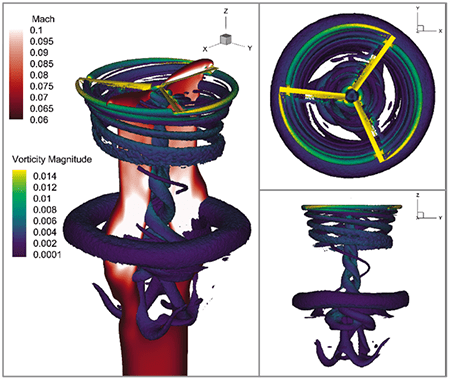
Tecplot 360 Benefits
Spend less time waiting and more time discovering. More CFD simulations are being run, grid sizes are getting larger, and data sets are being stored remotely. It’s essential that you have the right tools to handle large data sets, automate workflows, and visualize parametric results. Integrate XY, 2D, & 3D plots and get them looking exactly the way you want. Communicate your results with brilliant images and animations.
Analyze complex results, explore billion-cell models, verify engineering designs, automate routine tasks, and get excellent technical help when you need it.
Read our Datasheet (PDF).
See What’s New in Tecplot 360 Learn About the Tecplot 360 MB Beta
PyTecplot, Chorus and SZL Server are included with your 360 Free Trial and 360 license on maintenance.
 » Workflow Automation
 » Parametric Analysis
 » Remote Data Access
360 Resources
Tecplot 360 2025 R2
Release Date: December 11, 2025
Vulkan-Based Graphics Engine
Tecplot 360 2025 R2 introduces a new Vulkan-based graphics engine, delivering significantly improved performance, visual quality, and long-term platform compatibility. This modern rendering technology enables faster and smoother visualization, up to 3x to 400x faster, especially for large and complex datasets.
The Vulkan engine operates across all Tecplot 360 supported environments, including systems with discrete, integrated, or virtual GPUs, and even software rendering on CPUs. For best results, a discrete GPU with updated drivers is recommended.
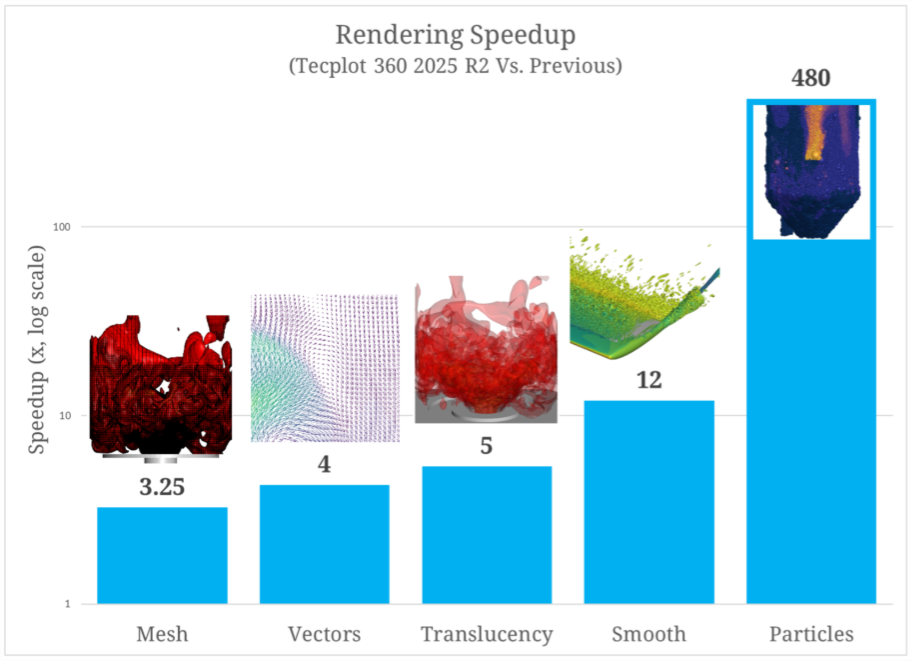
Updates and Improvements
- Faster Translucency with GPU-Accelerated OIT
- Faster Particle Rendering
- New Lighting Effects and Smoother Highlights
- Faster Vectors with GPU-Based Billboarding
- Anti-Aliasing
- Vulkan Support Across Windows, Linux, and macOS
Learn more in What’s New in Tecplot 360 or for a full account of updates and improvements, view the Release Notes.
360 Documentation
PyTecplot
Links to Docs, Installation, and Handy Python Scripts on PyTecplot
Tecplot 360 2013 R1 ADK
Platform Requirements |
|
| Windows Windows requires installation be run as administrator. |
64-bit (x86-64) Windows 11 |
| Mac We recommend always installing the latest OS update (run Software Update to make sure you have the latest version). |
ARM64 14, 15, 26 |
| Linux | Red Hat Enterprise Linux 8, 9Rocky Linux 8, 9Ubuntu 22.04 LTS, 24.04 LTSSUSE Linux Enterprise Desktop (SLED) 15 |
System Requirements |
|
| For more information, please read our Tecplot 360 Installation Guide. | |
Operating System Support |
|
| Tecplot aims to support desktop operating systems (Windows, macOS, RedHat, SLED, Ubuntu) that are under standard maintenance by their manufacturers, and are available at the time of the release of a Tecplot product. Tecplot does not guarantee, but may choose to support, platforms which are under an extended support policy, such as Windows “Extended Support” or RedHat’s “Extended Life-cycle Support.” For macOS, Apple does not have a well documented OS support policy. Tecplot intends to support the current macOS and two previous macOS versions. | |
FAQs
Getting Started
Q: How can I get started using Tecplot 360?
The fastest way to get up and running with Tecplot 360 is follow the steps in Getting Started with Tecplot 360.
Your Tecplot 360 installation has an “examples” folder, which contains several sample data files in Tecplot format. To open them, go to File > Load Data File(s), select the Tecplot Data Loader, and choose a data set.
For questions on how to perform specific actions in Tecplot 360, we recommend referring to the product User’s Manual (PDF) or HTML.
The documentation links are also available from the Welcome Screen after you run Tecplot 360.
Q: What is the first thing I need to do in order to make the plots I want to see?
If you’re new to Tecplot 360, we recommend that you start by working through the tutorials provided in the Getting Started Guide included in your installation, or visit Getting Started with Tecplot 360.
Downloading and Upgrading Software
Q: Where do I download the latest software version?
Tecplot 360 can be downloaded through our customer portal, My Tecplot link in the top menu. You will be prompted to log in to access the software downloads. If you do not already have an account, you can request one.
Q: How can I get a Mac version of Tecplot?
Supported Mac versions of Tecplot 360 software can be downloaded from our customer portal, My Tecplot (link at the top of page).
Automation (PyTecplot, Macros and Add-ons)
How do I use PyTecplot, the Python API in Tecplot 360?
PyTecplot docs, videos and FAQs are all on a separate web page dedicated to PyTecplot »
Q: How do I export an image when I have hundreds of zones?
If you have hundreds of zones it can be time consuming to switch to each zone and export an image. Macros can be used here to automatically activate each zone in succession and export an image.
- Scripting > Record Macro,
- Activate a zone,
- Export image
- Stop recording.
Then edit the macro file using a text editor and encase the export and activate call in a LOOP and ENDLOOP. Check the Scripting Guide in our documentation for additional information about these commands.
Q: Will macros and add-ons be compatible with Tecplot 360 EX?
Newer Tecplot 360 versions are backwards compatible with earlier versions of Tecplot 360.
- TecIO files are compatible with all versions of Tecplot 360.
- Add-ons will have to be recompiled. They are source compatible, but the libraries will need to be updated.
- Existing Macros are compatible with earlier Tecplot 360 versions. However, Macros created with Tecplot 360 2014 and later are not backwards compatible with earlier versions.
Technical Support, Versions, Maintenance
Q: What versions of Tecplot software do you currently support?
Technical support is offered to license holders who have a current TecPLUS™ subscription for software releases delivered in the current year and the past two calendar years. Installation-only support is offered to license holders who do not have a current TecPLUS™ subscription for software releases delivered in the current year and the past two calendar years.
Q: Can my older version of Tecplot 360 read .szplt format?
Newer Tecplot 360 versions are backwards compatible with earlier versions of Tecplot 360.
Versions of Tecplot 360 released before 2014 cannot read SZL (.szplt) file format. We recommend updating to the newest version.
Q: How do I set-up transient (time-varying) animation in Tecplot 360?
The Edit Time Strand tool can be used to set-up your data to be recognized as Transient. A Strand and SolutionTime will need to be assigned for each zone. Zones that are active at the same time step need to share SolutionTime, but have different Strand IDs.
Q: Where can I get more specific technical support?
Tecplot’s Support page has a complete list of technical support options.
Platforms and Requirements
Q: What platforms does the latest version of Tecplot 360 support?
Platforms supported by the latest version of Tecplot 360 are listed in Documentation & Platform Requirements. You can also find requirements in the Installation Guide or linked from the Tecplot 360 Welcome Screen.
For older versions, refer to the install.pdf file in the Tecplot 360 installation folder.
Q: What versions of Tecplot software do you currently support?
Technical support is offered to license holders who have a current TecPLUS™ subscription for software releases delivered in the current year and the past two calendar years. Installation-only support is offered to license holders who do not have a current TecPLUS™ subscription for software releases delivered in the current year and the past two calendar years.
Product Releases and SZL Technology
Q: What new features does the latest version of Tecplot 360 include?
Tecplot 360 version and features are listed on our Features Over Time.
If you are running an older versions, you can refer to the release.pdf file in your Tecplot 360 installation folder.
Q: What is SZL(subzone load-on-demand) technology?
SZL stands for subzone load-on-demand. It is our proprietary technology that increases memory efficiency by combining data management algorithms, advanced data requirement predictors, parallelization and additional code optimizations.
Resources that explain the technology and the application of SZL can be found on the SZL Technology page.
Installation and Running Multiple Versions
Q: I installed the trial version, do I need to uninstall it before installing my purchased version?
You do not need to uninstall the trial version. The installation of Tecplot software remains the same regardless of the license type.
Q: If I want to install Tecplot Software on a new computer, is a new license key needed?
The answer depends on which type of license you have.
Single-user license
If you have a Single-User license, you will need to submit a License Transfer Request from our customer portal, My Tecplot (link at the top of page). Once that is complete you can use your Activation Code to obtain a key for your new computer. If you are not using an Activation code, you can generate a new license key from My Tecplot or by contacting Technical Support.
Network license
If you have a network license, you will not need a new license key. Install your software on the new computer, choose the network install mode, and include your license server name when prompted. Your software should run successfully as long as your license manager is set up correctly.
Q: Can multiple versions of Tecplot software be run on the same computer?
Yes, multiple versions of Tecplot software can run on the same computer. Similarly, Tecplot 360, Tecplot Focus, Tecplot RS can be run on the same computer.
Q: Can Tecplot 360, Tecplot Focus, and Tecplot RS be run on the same computer?
Yes, the products can run on the same computer without conflicting with each other.
Q: Can Tecplot software be run on a virtual machine?
With a network license, Tecplot software can be run on a virtual machine.
A single-user license key does not allow running on a virtual machine. If you need to use Tecplot software on a virtual machine with a single-user license, please email Technical Support to discuss your situation.
Q: After installation, the box for inputting the key is blocked. How can I get my Key?
You can get a license key through our customer portal, My Tecplot (link at the top of page).
How to Purchase & License Renewal
Q: How much will it cost to upgrade to the newest version if I renew my license?
For customers with a current TecPLUS service, there is no charge to upgrade from an earlier version of Tecplot software. If your TecPLUS has expired, you can request a renewal.
Q: Where can I buy Tecplot Software?
In the U.S. and Canada, please call our sales engineers at 1.800.763.7005 or email us at sales@tecplot.com. You can also use the online request a quote form.
In other regions of the world, you can buy Tecplot 360 from one of our international distributors.
Licenses and License Keys
Q: How can I get a license key needed to run Tecplot software?
Single-user licenses for Tecplot software released in 2016 or later can be activated with an Activation Code. The Activation Code is provided to you when you purchase or renew your TecPLUS service for a single-user license. Once the Tecplot installation has finished, you will be asked to enter in the Activation Code on your first start-up.
A license key file is required to run Tecplot Software released before 2016, Network licenses, or if you do not have an internet connection.
Q: Do I need to install a license manager to run Tecplot software?
Current Tecplot network licenses require an installation of a Reprise License Manager (RLM). Single-user Tecplot licenses do not.
Q: How do I install my license key after I receive it?
After you install your software, you will need to activate it.
Instructions are available in the activation_instructions.html file located in the directory where Tecplot is installed.
Complete details about Tecplot Licensing are available in the Installation Guide for your product (also located in the Doc folder where Tecplot is installed).
Q: My license key is not accepted as valid even though I have a valid license. What do I do?
This means that your license key file may not be valid. Please email Technical Support